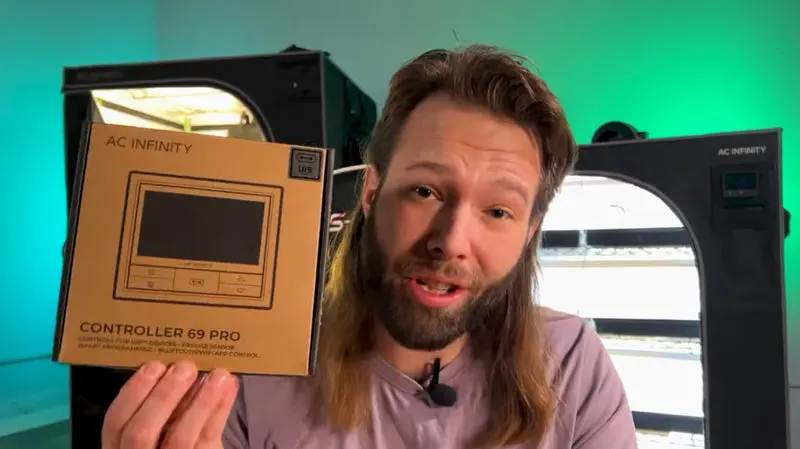
Hey everyone! If you’re ready to take the guesswork out of your indoor gardening, you’re in the right place.
You'll find it alongside other tabs like graphs, history logs, and port views.
The Controller 69 Pro offers three distinct automations, or “recipes,” for different growth stages: vegetative, flowering, and seedling. Each stage requires a unique setup, and you can’t run one while another is active. Once an automation is running, your controller adheres strictly to that setting.
When you select it, you’ll notice solid blue lines next to the connected devices.
This indicates that the Controller 69 is reading those devices as available for the automation.
Starting with the light device, specifically the evo8, the default setting is a continuous cycle. This operates on a 24-hour time period. What’s great about this feature is that you can set everything within the automation itself. No need to hop between tabs or ports. You can also adjust the minimum and maximum levels directly in the automations tab.
You have two main options for light settings: cycle and schedule. The cycle setting is ideal for an 18-on, 6-off setup that begins immediately upon setting. Alternatively, the schedule setting allows you to specify exact on and off times, if you need your lights to operate at specific times.
The humidifier tab, focused on VPD (Vapor Pressure Deficit), offers options for VPD Trigger and VPD Mode Triggers. These settings help dial in the ideal humidity levels for your grow space. For instance, the Cloud Forge humidifier works well with the VPD set trigger, maintaining constant VPD levels.
Similar to the light device, the humidifier can also be set with buffer zones to allow some tolerance for operation, ensuring a stable environment for your plants.
The automation settings here will control all devices registered as fans, including circulating fans. This means that changes to the inline fan settings will apply to all fan devices in your setup.
Resetting and Customizing Automations
If you find yourself overwhelmed by changes, don’t worry. Each automation section allows you to delete or reset the automation, giving you a fresh start. This feature is especially useful for customizing settings to match your specific grow needs.
After resetting, remember that you can’t control the ports outside of the automation if the automation is active. This prevents contradictory operations and ensures your settings remain consistent.
The Controller 69 Pro’s automation and recipes features are designed to simplify and enhance your indoor gardening experience. Whether you’re a new grower or a seasoned veteran, these tools take the guesswork out of growing, allowing you more time to enjoy and learn about your plants.
What is VPD? Everything You Need to Know
Is the AC Infinity Controller 69 Pro compatible with devices from other brands?
How many devices can I control with the AC Infinity Controller 69 Pro?
The AC Infinity Controller 69 Pro can control up to four devices independently. This allows you to manage multiple aspects of your grow tent’s environment, such as fans, lights, and humidifiers.
Can I control the AC Infinity Controller 69 Pro remotely?
Yes, you can control the Controller 69 Pro remotely using the AC Infinity App, which supports both Bluetooth and WiFi connections. This feature allows for convenient management and monitoring of your grow tent’s environment from anywhere.
What is VPD and how does the Controller 69 Pro use it?
VPD (Vapor Pressure Deficit) measures the difference between the moisture in the air and the moisture the air can hold when it is saturated. The Controller 69 Pro tracks VPD by measuring ambient temperature, relative humidity, and the plant’s leaf temperature to ensure optimal transpiration and nutrient uptake. You can set VPD triggers to automate devices and maintain the desired environment.
How do I set up the Controller 69 Pro?
To set up the Controller 69 Pro, follow these steps:
Plug the temperature/humidity sensor into the designated port.
Connect your UIS device to one of the four ports on the controller.
Use the Port Button to select the port where your device is connected.
Use the Mode Button to choose the desired program for your device.
Adjust the mode parameters using the Up/Down buttons.
Repeat for additional devices if needed.
What programming options are available with the Controller 69 Pro?
The Controller 69 Pro offers several programming options, including temperature and humidity triggers, VPD triggers, timers, cycles, and schedules. These options allow you to automate and customize the operation of your devices to create the optimal growing environment.
Can I use the Controller 69 Pro for advanced programming and data analysis?
Yes, by connecting the Controller 69 Pro to the AC Infinity App via Bluetooth or WiFi, you can access advanced programming features, set alarms, receive notifications, view historical charts, and export data for further analysis.
How do I reset my automations if I make a mistake?
Each automation section on the Controller 69 Pro allows you to either delete the automation or reset it. This feature enables you to start from a clean slate and customize settings to match your specific needs without the confusion of previous configurations.

Questions & discussion
Have a question or something useful to share? Start the conversation.